
Need help with your Propress PRO290?
Find the information you need to set up, operate and maintain your Propress PRO290 professional garment steamer. Follow the getting started guide, check what’s included with your steamer, or use the troubleshooting advice below to help resolve common issues.
If you still need assistance, you can contact our Australian team using the support form at the bottom of this page.
Getting started
New to your PRO290? Start here.
Get to know your Propress PRO290 professional garment steamer with our product usage guide.
Watch the PRO290 product usage guide to learn how to set up and use your steamer.

WHAT'S IN YOUR BOX
Everything you need to get started.
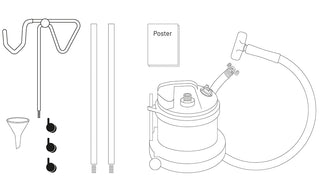
Your Propress PRO290 package includes:
- 3-partart pole set and top hook
- Steam hose with aluminium nozzle and protective cotton cover/bag
- 3 Castors
- Funnel
- Safe Operating Poster
- User Manual
Refer to your User Manual for assembly, operating and safety instructions.
PRO290 Troubleshooting
Check that the steamer is plugged in securely and try a different power socket. Check the plug fuse and replace it if necessary.
If the steamer still has no lights or does not heat up, stop troubleshooting and contact Propress for assistance.
Try connecting the steamer to another power socket.
If the steamer still does not heat up, stop using it and contact Propress for assistance.
Stop using the steamer and contact Propress to arrange a service assessment. Do not continue replacing fuses or attempting to operate the machine.
Check whether the steamer has been overfilled. If it has, switch off the machine, allow it to cool and empty the tank before refilling it to the recommended level.
Check the filler cap for visible damage and ensure the hose is not kinked. If the leak continues, contact Propress for assistance.
The steamer may need cleaning or descaling. Follow the approved PRO290 cleaning and descaling instructions, and use only products recommended for this model.
If the buzzing or beeping continues, contact Propress for assistance.
Switch off the steamer and allow it to cool fully before checking the hose connection.
Check that the hose is fitted correctly. If the connection continues to leak, or any part appears damaged, do not use the steamer until you have contacted Propress for advice.
Switch off the steamer and allow it to cool before inspecting the handle.
Check for visible damage or cracks. If the handle is damaged, it should be replaced before the steamer is used again.
Contact Propress if you need help identifying the correct replacement part.
Check whether the steamer has been overfilled. If it has, switch off the machine, allow it to cool and empty the tank before refilling it to the recommended level.
If water continues to leak from the base, stop using the steamer and contact Propress to arrange a service assessment.
LOOKING AFTER YOUR PROPRESS
Still Need Help?
If you've followed the troubleshooting guidance above and your PRO290 still isn't performing as it should, our Australian team can help you work out the next step.
Here's what happens next:
- Tell us what's happening. Complete the support form below and include your steamer's serial number, model number, business name and store location where applicable.
- We'll review your request. Our team will assess the information and advise whether a service assessment is required.
- We'll explain the next steps. If your steamer needs to be assessed, we'll advise you about the service arrangements and any applicable costs.
- You approve the cost before repairs begin. If a repair quote is required, no repair work will proceed without your approval.
Once the repair has been approved, we'll advise you about the repair and return arrangements. If a replacement is required, our team will discuss the next step with you.
Still need help?
If you've followed the troubleshooting guidance above and your steamer still isn't performing as it should, our Australian team can help.
Complete the support enquiry form below and tell us what's happening with your PRO290 / PRO580. Please include your steamer's serial number and a clear description of the issue so we can better understand how to assist.
Tell Us What Is Happening
If you've tried the troubleshooting steps above and still need help, tell us a little about what's happening with your PRO290. Our team will review your request and advise on the next step.