
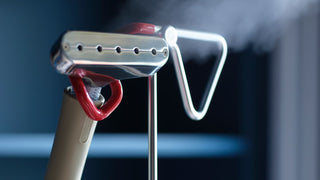
Need help with your Propress PRO580?
Find the information you need to set up, use and care for your Propress PRO580 professional garment steamer.
Whether you're getting started, looking after your equipment or troubleshooting an issue, this guide will help you find the right information.
Getting started
Using your PRO580
Follow the operating instructions to set up your PRO580 and get the best from your professional garment steamer.
Watch the PRO580 demonstration video below for guidance on using your steamer.

WHAT'S INCLUDED WITH YOUR PRO580?
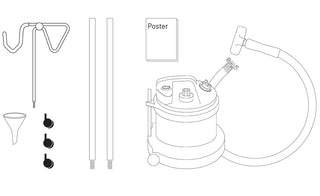
Your PRO580 comes with the components and accessories needed to get started:
- 3-part pole set and top hook
- Steam hose with aluminium nozzle and protective cotton cover/bag
- 3 Castors
- Funnel
- Safe Operating Poster
- User Manual
If an item appears to be missing from your order, please contact Propress using the support enquiry form below.
PRO580 TROUBLESHOOTING
Having an issue with your PRO580? Start with the guidance below. These common questions may help you identify the issue and determine what to do next.
Check that the power supply is connected and switched on. Make sure the power outlet is working and that the steamer's controls are set correctly.
If the unit still won't operate, switch it off and disconnect it from the power supply before requesting further assistance.
Check that the unit has sufficient water and has been allowed time to heat up. Check that the steam hose is correctly connected.
If the problem continues, switch off and disconnect the unit before contacting Propress.
Stop using the steamer and disconnect it from the power supply.
Repeated fuse failure may indicate an electrical fault. Do not continue resetting or replacing fuses in an attempt to operate the unit. Contact Propress for assistance.
If you notice water or steam escaping from the filler cap, switch off the unit and allow it to cool before checking it.
Do not attempt to open or remove the filler cap while the unit is hot or pressurised. If the issue continues once the unit is cool, contact Propress.
If your PRO580 is making an unusual buzzing or beeping sound, switch it off and check that it has sufficient water.
If the sound continues or you are unsure what is causing it, stop using the unit and contact Propress for assistance.
Switch off the steamer and disconnect it from the power supply. Allow the unit to cool before inspecting the hose connection.
If the connection continues to leak, do not continue operating the steamer. Contact Propress for assistance.
Allow the steamer to cool completely before inspecting the handle.
Check the handle for signs of damage or cracking. If the handle is damaged, it must be replaced before the steamer is used again.
If the handle becomes unusually hot or uncomfortable to hold, stop using the steamer.
If the issue persists or you are concerned about the handle temperature, contact Propress for assistance.
Switch off and disconnect the steamer. Allow it to cool before inspecting the unit.
If water continues to leak from the base, do not use the steamer. Contact Propress for assistance.
LOOKING AFTER YOUR PROPRESS
CARING FOR YOUR PRO580
Regular care helps keep your Propress steamer operating reliably and supports its long-term performance.
- Follow the care and maintenance instructions in your steamer's User Manual.
- Use and maintain the unit in accordance with the manufacturer's instructions.
- Check the steam hose and connections periodically for visible signs of wear or damage.
- Switch off and disconnect the unit before carrying out routine external cleaning.
- Allow the unit to cool before handling or storing it.
For maintenance procedures specific to your model, refer to the User Manual.
Still need help?
If you've followed the troubleshooting guidance above and your steamer still isn't performing as it should, our Australian team can help.
Complete the support enquiry form below and tell us what's happening with your PRO580. Please include your steamer's serial number and a clear description of the issue so we can better understand how to assist.
Tell Us What Is Happening
If you've tried the troubleshooting steps above and still need help, tell us a little about what's happening with your PRO580. Our team will review your request and advise on the next step.